A Select Case in VBA is a conditional check function.
In my opinion, it is a bit easier to read than the If statement.
It controls program flow based on the condition of a variable
In the following example I am using the Select Case to evaluate the price of a certain security.
The “PriceDecision” function returns the result based on the price value passed to it.
Public Function PriceDecision(dblPrice As Double) As String

    Dim strDecision As String

    Select Case dblPrice
        Case 1.1323 'S1
            strDecision = "Buy"
        Case 1.1216 'S2
            strDecision = "Buy"
        Case 1.111 'S3
            strDecision = "Buy"

        Case 1.1622 'R3
            strDecision = "Sell"
        Case 1.1558 'R2
            strDecision = "Sell"
        Case 1.1481 'R1
            strDecision = "Sell"
        Case Else
            strDecision = "Hold"
    End Select

    PriceDecision = strDecision

End Function
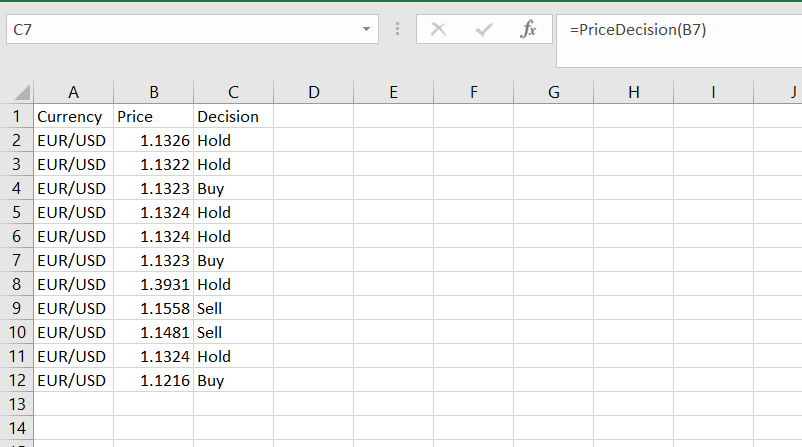
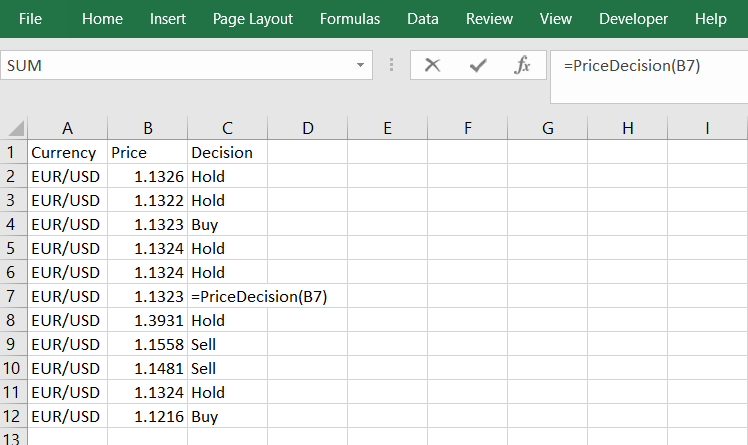
Here are some screenshots (and these values are just sammples!)
The result of the custom function is in column “C” the “Decision” column.
Watch me do it:

Let me know if you have any questions.