This post is actually an answer to a question on a youtube video
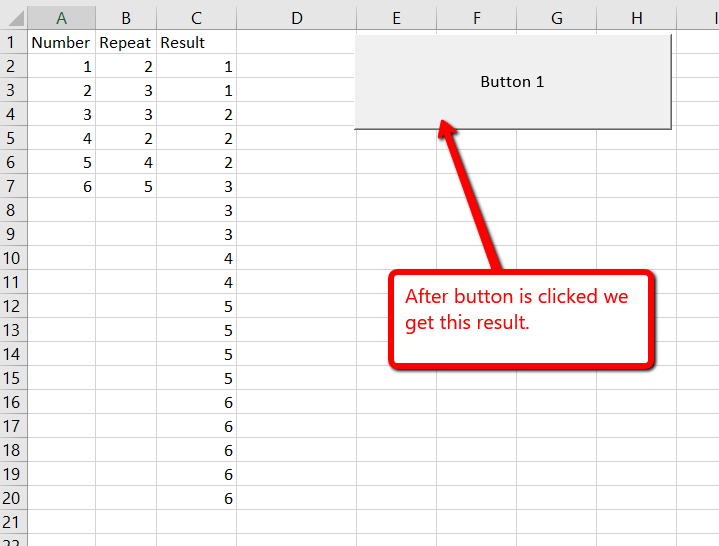
“I am facing one problem during working with excel, how do I solve below….. Serial number in row:1,2,3,4………… Required no of repit :2,1,3,2………… Answer will be : 1,1,2,3,3,3,4,4…….. How do I solve this problem??? Where one and another dejit will repit continuously.. Please help to find a way to solve this problem. Thank you.”
Here is the setup:
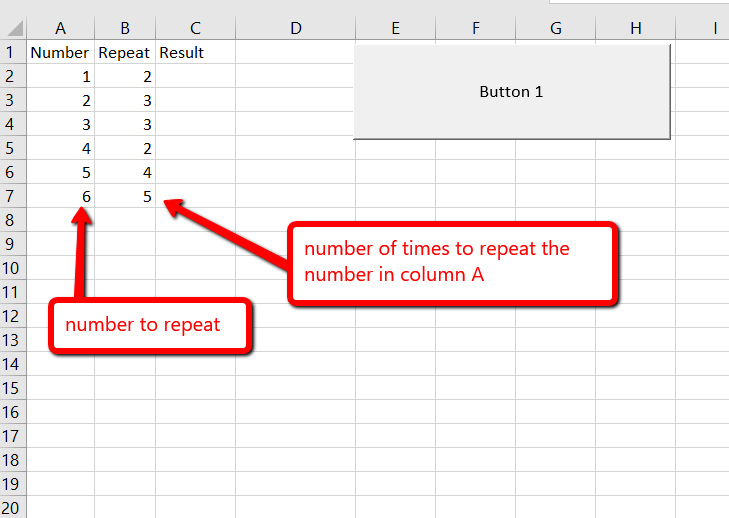
For this we are going to use a for loop to loop the cells and another for loop to insert the results.
Paste this code into a module, and we’ll call it from a button on the worksheet.
Sub Button1_Click()
    Dim intValue As Integer
    Dim intRowsToEvaluate As Integer

    Dim intRepeat As Integer

    Dim intResultRow As Integer

    intRowsToEvaluate = 20

    Dim intRow As Integer

    For intRow = 2 To intRowsToEvaluate
        'get the value and the number of times to repeat the value.
        intValue = Range("A" & intRow)
        intRepeat = Range("B" & intRow)

        'get the last result row used
        lngLastRow = FindLastRow("C")
        lngLastRow = lngLastRow + 1

        'enter the results
        For intResultRow = 1 To intRepeat
            Range("C" & lngLastRow) = intValue
            lngLastRow = lngLastRow + 1
        Next

    Next

End Sub

Function FindLastRow(WhichColumn As String) As Long

    Dim lngLastRow As Long

    'move to the last row on the worksheet and find the last used cell.

    With ActiveSheet
        lngLastRow = ActiveSheet.Cells(1048576, WhichColumn).End(xlUp).Row
    End With

    FindLastRow = lngLastRow

End Function
****************************************************
|
|