Hi everyone, in the previous post
How To Make A Basic Excel VBA UserForm Search Box
I showed how to create a search form based on three columns, but
the issue with it was that it shows all the items in the column, and
doesn’t filter the data based on the previous selection.
In this post I will show you how to limit your selection based on the previous selection.
For example, here you see a sorted list of unique years:

Here you’ll see the makes that belong to those years:

We are going to be using the ADO library which makes this very easy and straight forward.
With ADO we don’t have to write extra code for selecting only unique values and sorting the list items.
We’ll let ADO do the “heavy lifting” for us so we don’t have to write so much code.
I’ll compare the 2 ways of writing this in another post.
Before we were using the “LoadBoxes” procedure which was loading all the combo boxes without ADO.
When we initialize the UserForm we are loading all the comboboxes with unique values:
Private Sub UserForm_Initialize()
    'LoadBoxes

    LoadYears
    LoadMakes
    LoadModels

End Sub

Private Sub LoadYears()
    'Purpose: Load combo with unique years

    Dim cnn As Object
    Dim rst As Object
    Dim strSQL As String
    Dim lngCount As Long
    Dim intCounter As Integer

    Me.cboYear.Clear

    'Set up the connection to the Excel worksheet
    Set cnn = CreateObject("ADODB.Connection")
    With cnn
        .Provider = "Microsoft.ACE.OLEDB.12.0"
        .ConnectionString = "Data Source=" & ThisWorkbook.Path & "\" & ThisWorkbook.Name & ";" & _
            "Extended Properties=""Excel 12.0 Xml;HDR=YES"";"
        .Open
    End With

    'In order to do queries with a WHERE clause, you need to name the range, otherwise use the worksheet name.

    strSQL = "SELECT DISTINCT [Year] FROM [newtable] ORDER BY [Year]"

    Set rst = cnn.Execute(strSQL)

    lngCount = 0

    If Not rst.EOF Then
        Do Until rst.EOF
            Me.cboYear.AddItem rst(0)

           lngCount = lngCount + 1
           rst.Movenext
        Loop

        rst.Close
        Set rst = Nothing
        cnn.Close
        Set cnn = Nothing

    Else

        Me.lblMessage.Caption = "No data found based on your selections."
        DoEvents
    End If


End Sub

Private Sub LoadMakes()
    'Purpose: Load combo with unique makes

    Dim cnn As Object
    Dim rst As Object
    Dim strSQL As String
    Dim lngCount As Long
    Dim intCounter As Integer

    Me.cboMake.Clear

    'Set up the connection to the Excel worksheet
    Set cnn = CreateObject("ADODB.Connection")
    With cnn
        .Provider = "Microsoft.ACE.OLEDB.12.0"
        .ConnectionString = "Data Source=" & ThisWorkbook.Path & "\" & ThisWorkbook.Name & ";" & _
            "Extended Properties=""Excel 12.0 Xml;HDR=YES"";"
        .Open
    End With

    'In order to do queries with a WHERE clause, you need to name the range, otherwise use the worksheet name.

    strSQL = "SELECT DISTINCT [Make] FROM [newtable] ORDER BY [Make]"

    Set rst = cnn.Execute(strSQL)

    lngCount = 0

    If Not rst.EOF Then
        Do Until rst.EOF
            Me.cboMake.AddItem rst(0)

           lngCount = lngCount + 1
           rst.Movenext
        Loop

        rst.Close
        Set rst = Nothing
        cnn.Close
        Set cnn = Nothing
    Else

        Me.lblMessage.Caption = "No data found based on your selections."
        DoEvents
    End If


End Sub


Private Sub LoadModels()
    'Purpose: Load combo with unique makes

    Dim cnn As Object
    Dim rst As Object
    Dim strSQL As String
    Dim lngCount As Long
    Dim intCounter As Integer

    Me.cboModel.Clear

    'Set up the connection to the Excel worksheet
    Set cnn = CreateObject("ADODB.Connection")
    With cnn
        .Provider = "Microsoft.ACE.OLEDB.12.0"
        .ConnectionString = "Data Source=" & ThisWorkbook.Path & "\" & ThisWorkbook.Name & ";" & _
            "Extended Properties=""Excel 12.0 Xml;HDR=YES"";"
        .Open
    End With

    'In order to do queries with a WHERE clause, you need to name the range, otherwise use the worksheet name.

    strSQL = "SELECT DISTINCT [Model] FROM [newtable] ORDER BY [Model]"

    Set rst = cnn.Execute(strSQL)

    lngCount = 0

    If Not rst.EOF Then
        Do Until rst.EOF
            Me.cboModel.AddItem rst(0)

           lngCount = lngCount + 1
           rst.Movenext
        Loop

        rst.Close
        Set rst = Nothing
        cnn.Close
        Set cnn = Nothing
    Else

        Me.lblMessage.Caption = "No data found based on your selections."
        DoEvents
    End If


End Sub
We’ll use the combo box’s “Change” event to get the pass the combo box’s value to load the correct values on the others.
First when the year changes:
Private Sub cboYear_Change()
    'MsgBox "change model for " & Me.cboYear.Value
    ChangeMakes Me.cboYear.Value

End Sub

Private Sub ChangeMakes(year)
    'Purpose: Load combo with unique makes

    Dim cnn As Object
    Dim rst As Object
    Dim strSQL As String
    Dim lngCount As Long
    Dim intCounter As Integer


    If year = "" Then Exit Sub

    Me.cboMake.Clear

    'Set up the connection to the Excel worksheet
    Set cnn = CreateObject("ADODB.Connection")
    With cnn
        .Provider = "Microsoft.ACE.OLEDB.12.0"
        .ConnectionString = "Data Source=" & ThisWorkbook.Path & "\" & ThisWorkbook.Name & ";" & _
            "Extended Properties=""Excel 12.0 Xml;HDR=YES"";"
        .Open
    End With

    'In order to do queries with a WHERE clause, you need to name the range, otherwise use the worksheet name.

    strSQL = "SELECT DISTINCT [Make] FROM [newtable] WHERE Year= " & year & " ORDER BY [Make]"

    Set rst = cnn.Execute(strSQL)

    lngCount = 0

    If Not rst.EOF Then
        Do Until rst.EOF
            Me.cboMake.AddItem rst(0)

           lngCount = lngCount + 1
           rst.Movenext
        Loop

        rst.Close
        Set rst = Nothing
        cnn.Close
        Set cnn = Nothing
    Else

        Me.lblMessage.Caption = "No data found based on your selections."
        DoEvents
    End If


End Sub
Second when the make changes, we want to update the models:
Private Sub cboMake_Change()
    ChangeModels Me.cboYear.Value, Me.cboMake.Value
End Sub

    'Purpose: Load combo with unique makes

    Dim cnn As Object
    Dim rst As Object
    Dim strSQL As String
    Dim lngCount As Long
    Dim intCounter As Integer

    If year = "" And make = "" Then Exit Sub


    Me.cboModel.Clear

    'Set up the connection to the Excel worksheet
    Set cnn = CreateObject("ADODB.Connection")
    With cnn
        .Provider = "Microsoft.ACE.OLEDB.12.0"
        .ConnectionString = "Data Source=" & ThisWorkbook.Path & "\" & ThisWorkbook.Name & ";" & _
            "Extended Properties=""Excel 12.0 Xml;HDR=YES"";"
        .Open
    End With

    'In order to do queries with a WHERE clause, you need to name the range, otherwise use the worksheet name.

    strSQL = "SELECT DISTINCT [Model] FROM [newtable] WHERE [Year] =" & year & " AND [Make] = '" & make & "' ORDER BY Model"

    Set rst = cnn.Execute(strSQL)

    lngCount = 0

    If Not rst.EOF Then
        Do Until rst.EOF
            Me.cboModel.AddItem rst(0)

           lngCount = lngCount + 1
           rst.Movenext
        Loop

        rst.Close
        Set rst = Nothing
        cnn.Close
        Set cnn = Nothing
    Else

        Me.lblMessage.Caption = "No data found based on your selections."
        DoEvents
    End If


End Sub
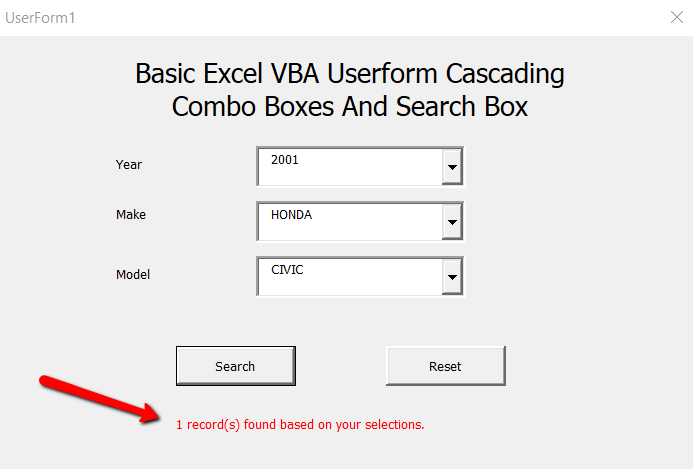
So now when we search, we’ll always have a result!
    'Purpose: Find the item on the screen based on the textbox selections

    Dim cnn As Object
    Dim rst As Object
    Dim strSQL As String
    Dim lngCount As Long

    'Set up the connection to the Excel worksheet
    Set cnn = CreateObject("ADODB.Connection")
    With cnn
        .Provider = "Microsoft.ACE.OLEDB.12.0"
        .ConnectionString = "Data Source=" & ThisWorkbook.Path & "\" & ThisWorkbook.Name & ";" & _
            "Extended Properties=""Excel 12.0 Xml;HDR=YES"";"
        .Open
    End With


    'In order to do queries with a WHERE clause, you need to name the range, otherwise use the worksheet name.
    'strSQL = "SELECT * FROM [Sheet1$]"
    strSQL = "SELECT * FROM [newtable] WHERE [Year] =" & Me.cboYear & " AND [Make] = '" & Me.cboMake & "' AND [Model] = '" & Me.cboModel & "'"

    Set rst = cnn.Execute(strSQL)

    lngCount = 0

    If Not rst.EOF Then
        Do Until rst.EOF
           'output = output & rst(0) & ";" & rst(1) & ";" & rst(2) & vbNewLine
           'Debug.Print rst(0); ";" & rst(1) & ";" & rst(2)

           lngCount = lngCount + 1
           rst.Movenext
        Loop

        rst.Close
        Set rst = Nothing
        cnn.Close
        Set cnn = Nothing

        Me.lblMessage.Caption = lngCount & " record(s) found based on your selections."
        DoEvents
    Else

        Me.lblMessage.Caption = "No data found based on your selections."
        DoEvents
    End If


End Sub
Watch how it’s done:
Let me know if you have any questions.
