This post will show you how to add text with a userform.
Step 1 – Add your userform:
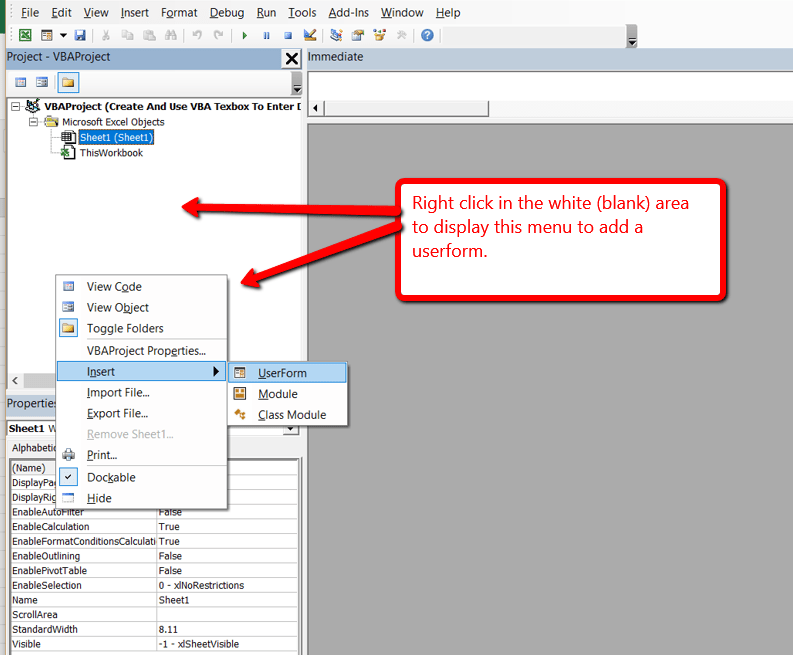
Step 2 – Add controls to your userform:

This is how your’s should look so far:

Add this code behind the “Add” button’s “Click” event:
Private Sub btnEnter_Click()
    Dim intRow As Integer

    If ActiveCell.Value = "" Then
        'move down a row
        intRow = ActiveCell.Row

        Range("A" & intRow) = Me.txtFName
        Range("B" & intRow) = Me.txtLName

        'now move down a row
        intRow = intRow + 1
        Range("A" & intRow).Select

    Else
        'start at the top of the range and find the next open cell
        Range("A2").Select
        Selection.End(xlDown).Select

        'add a row to the last entered cell
        intRow = ActiveCell.Row
        intRow = intRow + 1

        Range("A" & intRow) = Me.txtFName
        Range("B" & intRow) = Me.txtLName

        'now move down a row
        intRow = intRow + 1
        Range("A" & intRow).Select
    End If

End Sub
Now you can try it out, and align the controls and add new ones as you wish!
Let me know if you have any questions
[simple_contact_form]
****************************************************
|
|