This code with use VBA to create sheets based on a list of names.
In the following image, we have a data sheet listing names in column B. We want to create sheet names based
on the names in that column.
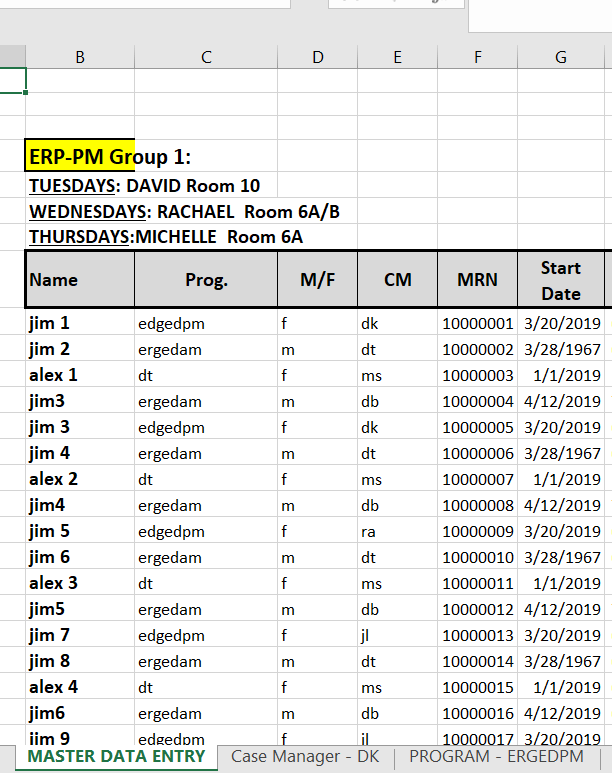
Make sure your Excel spreadsheet is saved as an .xlsm and accepts macros.
In the VBE, add a new module and type the following:
'loeblcomservices.com

Sub CreateSheets()
    Dim rng As Range
    Dim varTabName As Variant
    '************************************************************
    '1. Here is the range with the names to create sheet tabs for:
    '************************************************************

    Set rng = Sheets("MASTER DATA ENTRY").Range("B9:B11")

    'loop each row
    For Each varTabName In rng.Cells

        'create a sheet tab for the value
        CreateTab (varTabName.Value)

    Next

    Set rng = Nothing

    MsgBox "Operation Complete"

End Sub


Function CreateTab(TabName) As Boolean
    Dim blnExists As Boolean
    Dim strSheetName As String

    strSheetName = TabName

    'does sheet already exist?  If so, don't add it.
    blnExists = SheetExists(strSheetName)

    'if it doesn't exist then create it
    If blnExists = False Then
        Sheets.Add(After:=Sheets(Sheets.Count)).Name = strSheetName
    End If
End Function

Function SheetExists(strSheet As String) As Boolean
    SheetExists = Evaluate("ISREF('" & strSheet & "'!A1)")
End Function
When you press F5, and run the code, you’ll find the newly created sheets!

We could have done more than 3 but that’s a good example.
Let me know if you have any questions.
****************************************************
|
|