In this example I am going to show you how to query your worksheet for particular information using a UserForm.
Basically we are going to have a worksheet with data in it, and ask it a simple question:
“Does the criteria I selected in the UserForm exist in the worksheet?”
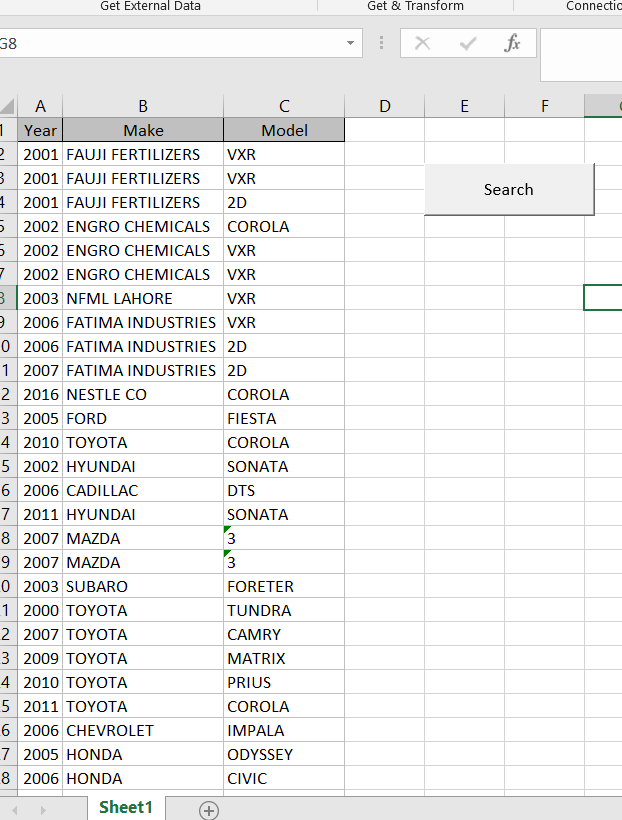
Here is a simple image of the worksheet:
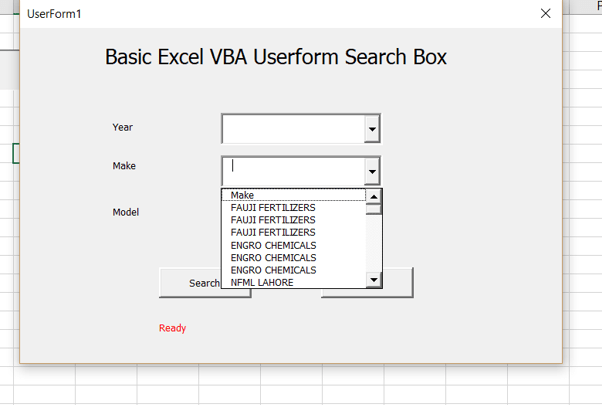
…and here is the simple UserForm which is shown whenever the “Search” button is clicked:

When the UserForm “intializes” the comboboxes are filled in:
Here is the code I am using:
Private Sub UserForm_Initialize()
    LoadBoxes
End Sub


Sub LoadBoxes()
    Dim intCounter As Integer

    With Me.cboYear
        .Clear
        For intCounter = 1 To 70
            .AddItem Sheets("Sheet1").Cells(intCounter, 1).Value
        Next intCounter
    End With

    With Me.cboMake
        .Clear
        For intCounter = 1 To 70
            .AddItem Sheets("Sheet1").Cells(intCounter, 2).Value
        Next intCounter
    End With

    With Me.cboModel
        .Clear
        For intCounter = 1 To 70
            .AddItem Sheets("Sheet1").Cells(intCounter, 3).Value
        Next intCounter
    End With
End Sub
Since I am using the “Load” feature in multiple places, I am putting all the code in the “LoadBoxes” procedure.
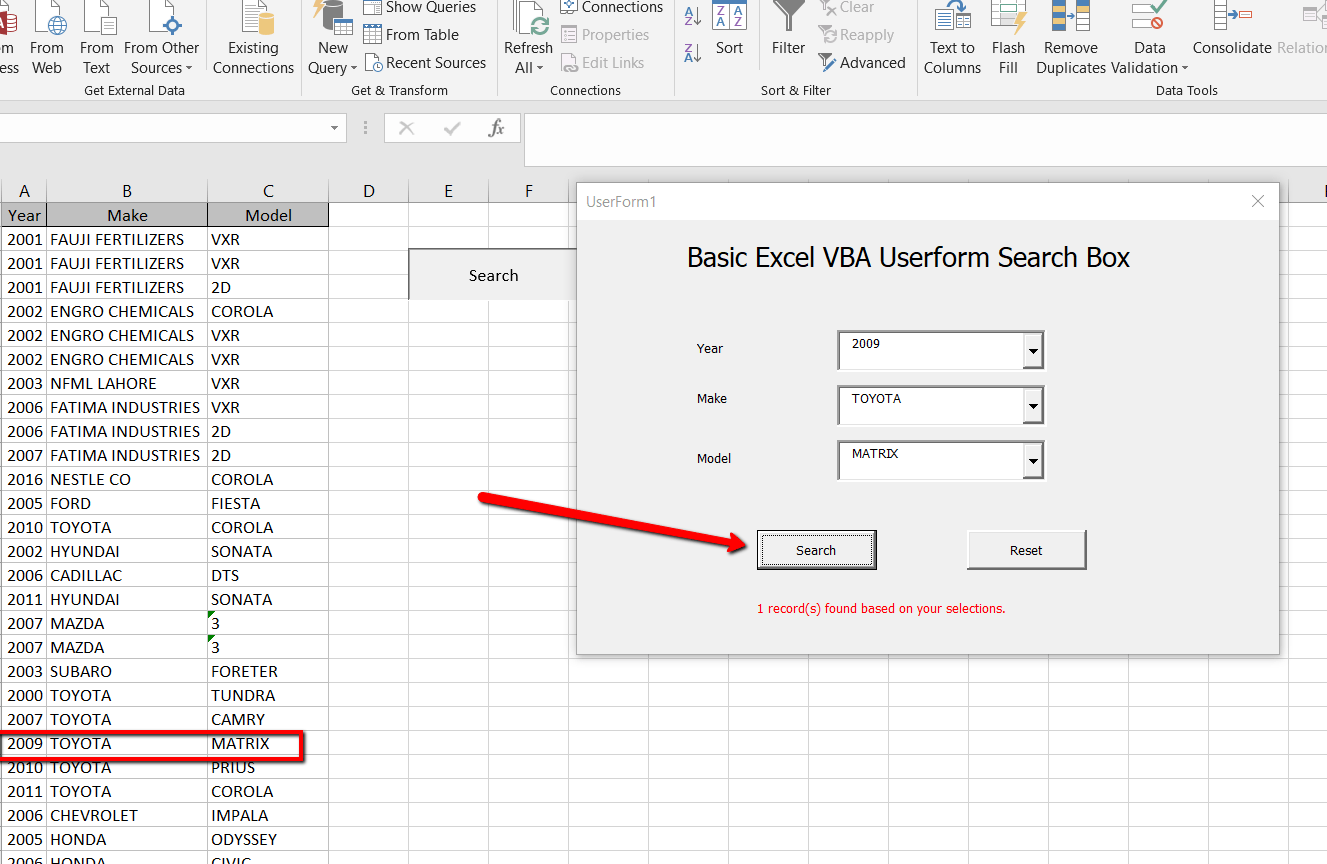
After making my selections, I click on the “Search” button and a SQL statement is executed and a records found count is taken.
Here is the SQL statement I am using:
Private Sub btnSearch_Click()
    'Purpose: Find the item on the screen based on the textbox selections

    Dim cnn As Object
    Dim rst As Object
    Dim strSQL As String
    Dim lngCount As Long

    'Set up the connection to the Excel worksheet
    Set cnn = CreateObject("ADODB.Connection")
    With cnn
        .Provider = "Microsoft.ACE.OLEDB.12.0"
        .ConnectionString = "Data Source=" & ThisWorkbook.Path & "\" & ThisWorkbook.Name & ";" & _
            "Extended Properties=""Excel 12.0 Xml;HDR=YES"";"
        .Open
    End With


    'In order to do queries with a WHERE clause, you need to name the range, otherwise use the worksheet name.
    'strSQL = "SELECT * FROM [Sheet1$]"
    strSQL = "SELECT * FROM [newtable] WHERE [Year] =" & Me.cboYear & " AND [Make] = '" & Me.cboMake & "' AND [Model] = '" & Me.cboModel & "'"

    Set rst = cnn.Execute(strSQL)

    lngCount = 0

    If Not rst.EOF Then
        Do Until rst.EOF

           lngCount = lngCount + 1
           rst.Movenext
        Loop

        rst.Close
        Set rst = Nothing
        cnn.Close
        Set cnn = Nothing

        Me.lblMessage.Caption = lngCount & " record(s) found based on your selections."
        DoEvents
    Else

        Me.lblMessage.Caption = "No data found based on your selections."
        DoEvents
    End If


End Sub
Excel views data that is formatted in consecutive columns as a table. So if I want to select the data from the entire sheet I can just use “[Sheet1$]”
However, since I want the ability to query individual columns, I need to set up a “named range”.
So here is the code all together:
Private Sub btnReset_Click()
    On Error Resume Next
    Selection.AutoFilter

    Me.cboYear.Clear
    Me.cboMake.Clear
    Me.cboModel.Clear

    Me.lblMessage.Caption = "Ready"

    LoadBoxes

End Sub

Private Sub UserForm_Initialize()
    LoadBoxes
End Sub


Sub LoadBoxes()
    Dim intCounter As Integer

    With Me.cboYear
        .Clear
        For intCounter = 1 To 70
            .AddItem Sheets("Sheet1").Cells(intCounter, 1).Value
        Next intCounter
    End With

    With Me.cboMake
        .Clear
        For intCounter = 1 To 70
            .AddItem Sheets("Sheet1").Cells(intCounter, 2).Value
        Next intCounter
    End With

    With Me.cboModel
        .Clear
        For intCounter = 1 To 70
            .AddItem Sheets("Sheet1").Cells(intCounter, 3).Value
        Next intCounter
    End With
End Sub
Private Sub btnSearch_Click()
    'Purpose: Find the item on the screen based on the textbox selections

    Dim cnn As Object
    Dim rst As Object
    Dim strSQL As String
    Dim lngCount As Long

    'Set up the connection to the Excel worksheet
    Set cnn = CreateObject("ADODB.Connection")
    With cnn
        .Provider = "Microsoft.ACE.OLEDB.12.0"
        .ConnectionString = "Data Source=" & ThisWorkbook.Path & "\" & ThisWorkbook.Name & ";" & _
            "Extended Properties=""Excel 12.0 Xml;HDR=YES"";"
        .Open
    End With


    'In order to do queries with a WHERE clause, you need to name the range, otherwise use the worksheet name.
    'strSQL = "SELECT * FROM [Sheet1$]"
    strSQL = "SELECT * FROM [newtable] WHERE [Year] =" & Me.cboYear & " AND [Make] = '" & Me.cboMake & "' AND [Model] = '" & Me.cboModel & "'"

    Set rst = cnn.Execute(strSQL)

    lngCount = 0

    If Not rst.EOF Then
        Do Until rst.EOF
           'output = output & rst(0) & ";" & rst(1) & ";" & rst(2) & vbNewLine
           'Debug.Print rst(0); ";" & rst(1) & ";" & rst(2)

           lngCount = lngCount + 1
           rst.Movenext
        Loop

        rst.Close
        Set rst = Nothing
        cnn.Close
        Set cnn = Nothing

        Me.lblMessage.Caption = lngCount & " record(s) found based on your selections."
        DoEvents
    Else

        Me.lblMessage.Caption = "No data found based on your selections."
        DoEvents
    End If


End Sub
Let me know if you have any questions.
[simple_contact_form]
****************************************************
|
|
